What Is HTML? A Complete Beginner’s Guide
If you are new to web development, one of the first technologies you will encounter is HTML. Whether you want to build a personal website, create a portfolio, or eventually become a professional web developer, understanding HTML is an essential first step.
At BeginnerCodeMastery, we believe that learning to code should start with a strong understanding of the basics. In this lesson, you will learn what HTML is, how it works, why it is important, and how it is used to create websites.
What Does HTML Stand For?
HTML stands for HyperText Markup Language.
HTML is the standard markup language used to structure content on websites. It tells a web browser what different parts of a webpage are and how they are organized.
For example, HTML can tell a browser:
This is a heading.
This is a paragraph.
This is an image.
This is a link.
This is a list.
This is a button.
This is a form.
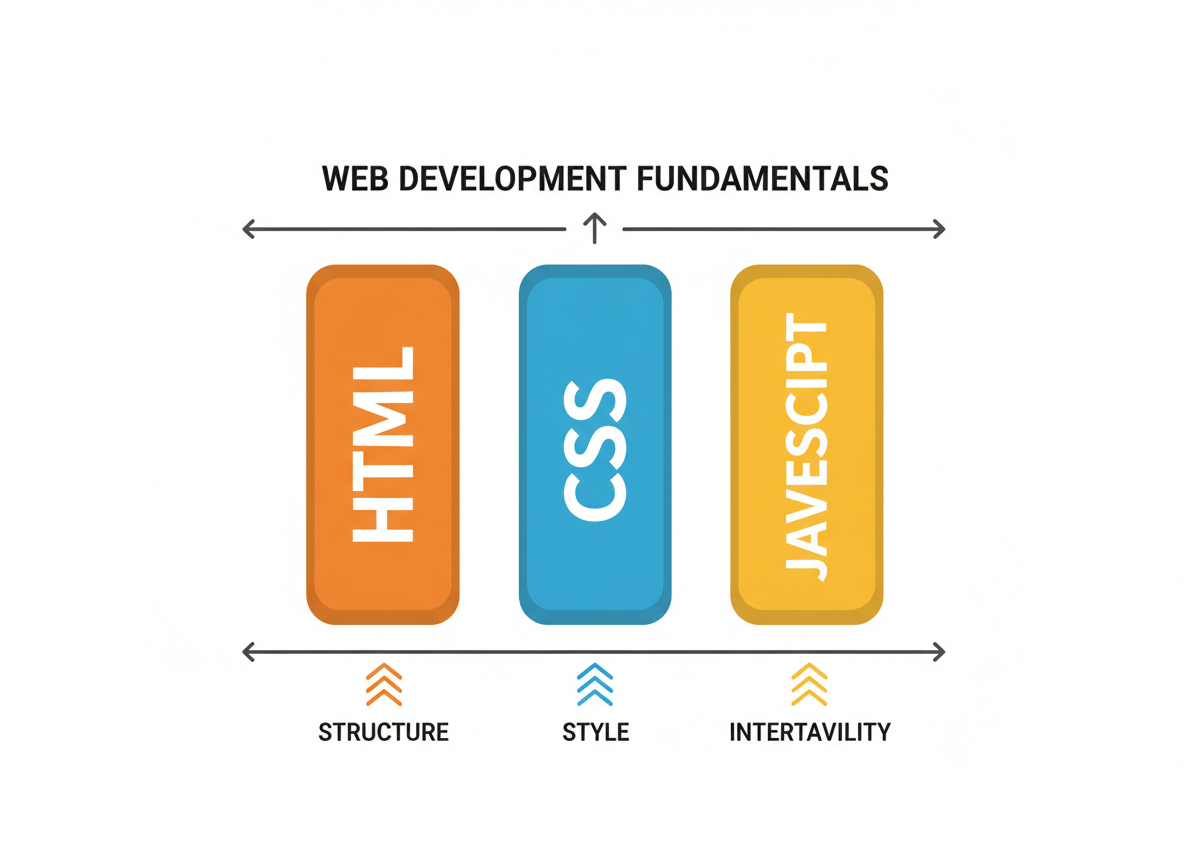
HTML provides the basic structure of a webpage, while other technologies such as CSS and JavaScript are used to control its appearance and behavior.
Is HTML a Programming Language?
A common question among beginners is:
“Is HTML a programming language?”
The answer is no.
HTML is a markup language, not a programming language.
Programming languages such as JavaScript, Python, and Java can be used to create logic, make decisions, perform calculations, and manipulate data.
HTML has a different purpose. It is used to structure and organize content.
Think of building a house:
HTMLis the structure of the house.
CSS is the design, colors, and appearance.
JavaScript adds interaction and behavior.
What Does HTML Do?
You will learn more about CSS and JavaScript later in your web development journey.
HTML gives structure to the content of a webpage.
Consider this simple example:
html
Welcome to My Website
This is my first webpage.
element tells the browser that the text is a main heading. The melement tells the browser that the text is a paragraph. When the browser reads this HTML, it understands the relationship between these two pieces of content. The result is a simple webpage containing a heading and a paragraph. Understanding HTML Elements HTML is made up of elements. An HTML element usually consists of an opening tag, content, and a closing tag. For example: html Hello, world!Let’s break it down: text Opening tag Hello Content Closing tagTogether, these parts create a paragraph element. You will use HTML elements throughout your entire web development journey. Some common HTML elements include: html
The
Main Heading
Subheading
This is a paragraph.
HTML Tags
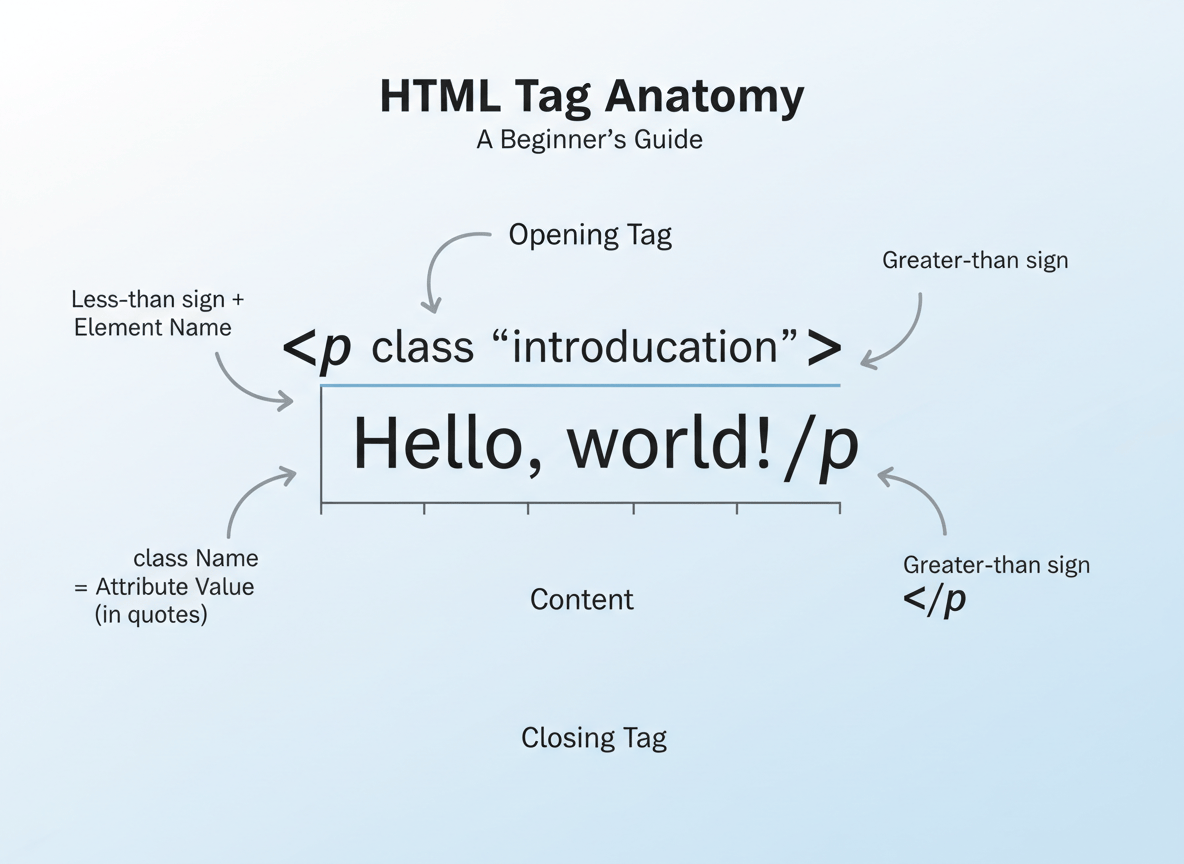
Each element has a specific purpose.
You will often hear the word tag when learning HTML.
is an opening tag, while: html
A tag is the part surrounded by angle brackets.
For example:
html
Welcome to BeginnerCodeMastery
is a closing tag.
Together, they create an HTML element:
html
Welcome to BeginnerCodeMastery
It is important to understand the difference between a tag and an element.
How Does a Browser Read HTML?
The tags are:
html
The complete element is:
html
Understanding this difference will make the rest of your HTML learning much easier.
Hello!
When you visit a website, your browser needs to understand the website’s content.
Browsers such as Chrome, Edge, Firefox, and Safari can read HTML documents and turn them into visual webpages.
The basic process looks like this:
text
HTML Code
↓
Web Browser
↓
Webpage
HTML, CSS, and JavaScript
For example, you might write:
html
Welcome to my website.
The browser reads the HTML and displays the content as a heading and a paragraph.
This is one of the fundamental concepts you should understand before moving forward with web development.
Modern websites usually use three important technologies together:
HTML
HTML provides the structure.
It defines what content exists on the page.
CSS
CSS controls the appearance.
It can change:
- Colors
- Fonts
- Spacing
- Sizes
- Layouts
- Animations
JavaScript
JavaScript adds behavior and interactivity.
It can be used for:
- Interactive buttons
- Menus
- Forms
- Dynamic content
- Web applications
- Animations
A simple way to remember this is:
HTML → StructureCSS → StyleJavaScript → Behavior
At BeginnerCodeMastery, you will learn these technologies step by step, starting with HTML.
What Can You Build With HTML?
HTML can be used to create the structure of many different types of websites.
For example, you can create:
- Personal websites
- Portfolio websites
- Blog pages
- Landing pages
- Documentation pages
- Business websites
- Contact pages
- Online resumes
- Simple web applications
HTML is also the foundation of more advanced web development.
Even when you eventually work with frameworks and modern technologies, you will still encounter HTML concepts.
Your First HTML Example
Let’s look at a very simple HTML document:
<!DOCTYPE html><html><head> <title>My First Website</title></head><body> <h1>Welcome to My Website</h1> <p>This is my first HTML page.</p></body></html>
Don’t worry if you don’t understand everything yet.
We will break down each part throughout this course.
For now, remember that an HTML document provides the structure that the browser uses to display a webpage.
Why Should You Learn HTML?
HTML is one of the easiest technologies to start with if you are completely new to web development.
You don’t need advanced programming knowledge to begin writing HTML.
You can create your first HTML page with just a few lines of code.
More importantly, learning HTML gives you a foundation for learning other web technologies.
Once you understand HTML, you can move on to:
HTML → CSS → JavaScript → Modern Web Development
This progression gives you a strong foundation for building websites and web applications.
HTML Is the Starting Point
Learning HTML may seem simple at first, but it is an important skill for anyone interested in web development.
You don’t need to memorize every HTML element immediately. The goal at the beginning is to understand how HTML works and how different elements are used to structure a webpage.
Throughout the HTML for Beginners course on BeginnerCodeMastery, you will gradually learn how to use headings, paragraphs, links, images, lists, forms, semantic elements, and many other HTML features.
By the end of the course, you will have the knowledge needed to create your own structured webpages from scratch.
What You’ll Learn Next
Now that you understand what HTML is, the next step is to learn how an HTML document is structured.
In the next lesson, you will learn about:
<!DOCTYPE html><html><head><title><body>- HTML document structure
- How to create your first complete HTML page
Next Lesson: Understanding the Basic Structure of an HTML Document